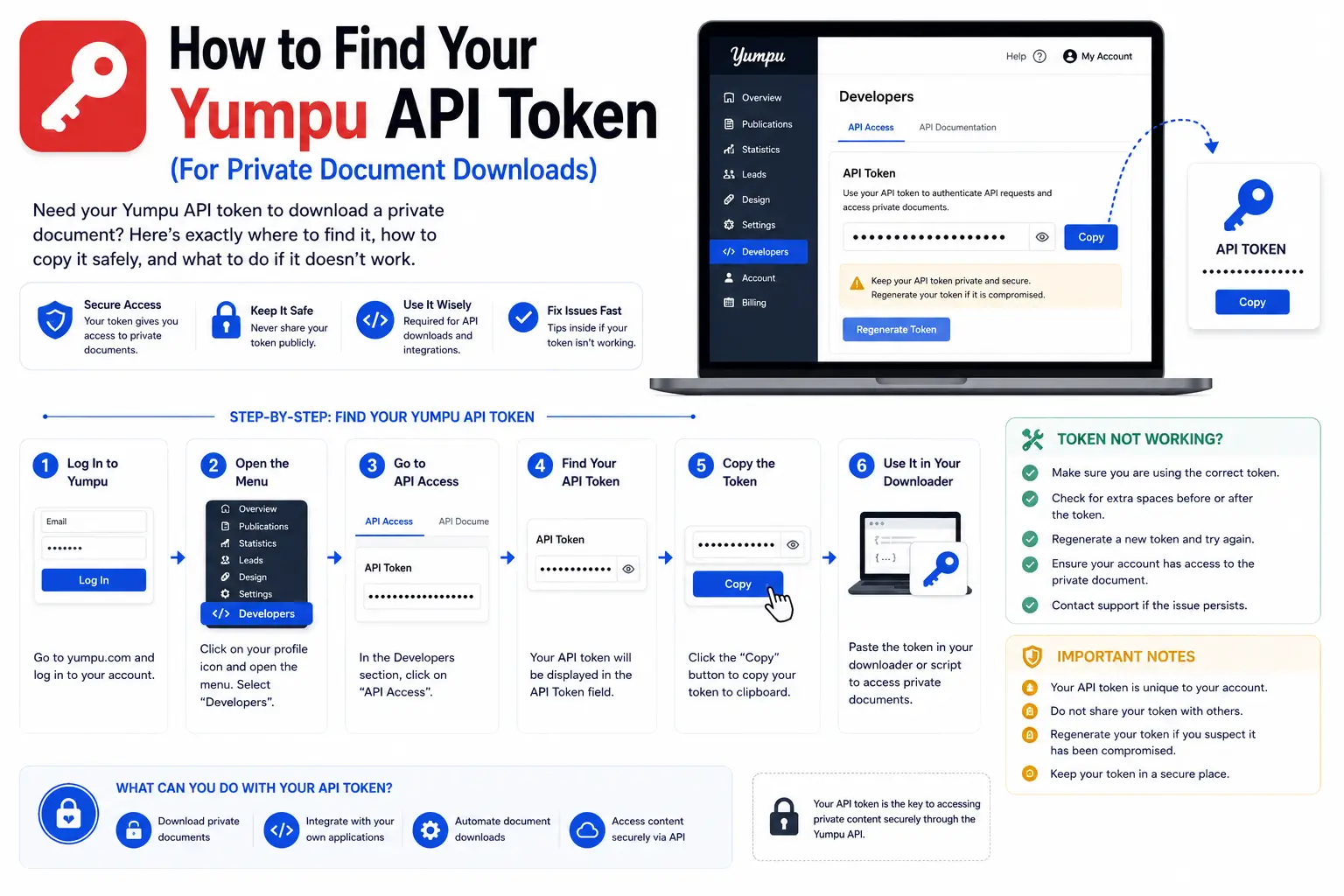
If you’re trying to download your own private Yumpu document, you’ll need something called an API token. This short guide shows you exactly where to find it, how to use it safely, and what to do if it isn’t working.
What Is a Yumpu API Token?
An API token is a unique code tied to your personal Yumpu account. It acts like a digital key that proves you’re allowed to access your own private documents — the ones that aren’t visible to the public.
Think of it like a password, but instead of typing it into Yumpu’s website, you provide it to a tool (like Yumpu Downloader) so that tool can “prove” to Yumpu’s servers that you have permission to view your content.
Important: A token does not grant access to other people’s private documents — only your own.
Step-by-Step: Finding Your Token
- Log in to Yumpu.com using your account email and password.
- Click on your profile icon in the top corner of the page.
- Select “My Profile” from the dropdown menu.
- Look for a section labeled “API” or “API Access” in your account settings.
- If you don’t already have a token, click “Generate Token”. If you do, it will be displayed there — click “Copy”.
That’s your token. It usually looks like a long string of random letters and numbers.
How to Use Your Token Safely
Once you have your token, here’s how to use it with Yumpu Downloader:
- Go to Yumpu Downloader and click the “My Private Document” tab.
- Paste your token into the API Token field. Click the eye icon (👁️) if you want to double-check you typed it correctly.
- Paste your private document’s link into the URL field.
- Click “Download My Private PDF.”
🔒 Security note: Your token is only used inside your own browser during the download. It is never saved, stored, or sent to any server other than Yumpu’s official API.
What Your Token Does Behind the Scenes
When you enter your token, Yumpu Downloader sends it directly to Yumpu’s official API endpoint to first look up your document’s details (like its title and total page count). Then, it’s used again briefly when fetching each page image, so private pages can load successfully.
Common Token Problems and Fixes
| Problem | Likely Cause | Fix |
|---|---|---|
| Token doesn’t work at all | Copied with extra spaces | Re-copy carefully, check for leading/trailing spaces |
| “Access denied” errors | Token expired or was regenerated | Go back to My Profile → API and copy the current token |
| Downloads fail even with token | Document belongs to a different account | Confirm you’re logged into the account that owns the document |
| Some pages load, others don’t | Temporary connection issue | Try the download again |
Never Share Your Token Publicly
Treat your API token like a password. Don’t post it in forums, screenshots, or share it with anyone you don’t fully trust — anyone with your token can access your private documents in the same way you can.
Frequently Asked Questions
Do I need a token to download public documents?
No. Public documents can be downloaded without any token using the “Public Document” tab. Learn more about the difference in our Public vs. Private Documents guide.
Does my token expire?
Tokens can be regenerated at any time from your Yumpu account, which will make any older token stop working.
Is it safe to enter my token into Yumpu Downloader?
Yes. Your token stays in your browser and is only sent directly to Yumpu’s official API — never saved anywhere else.
What if I don’t have a Yumpu account?
You’ll need to create a free Yumpu account first if you want to publish or access private documents. Public documents don’t require an account at all.
2 thoughts on “How to Find Your Yumpu API Token (For Private Document Downloads)”